
Before You Begin
Ensure you have already downloaded the correct installation file for your device from our Official Download Center. The instructions below will not work if you have an outdated or corrupted file.
Android Installation Setup
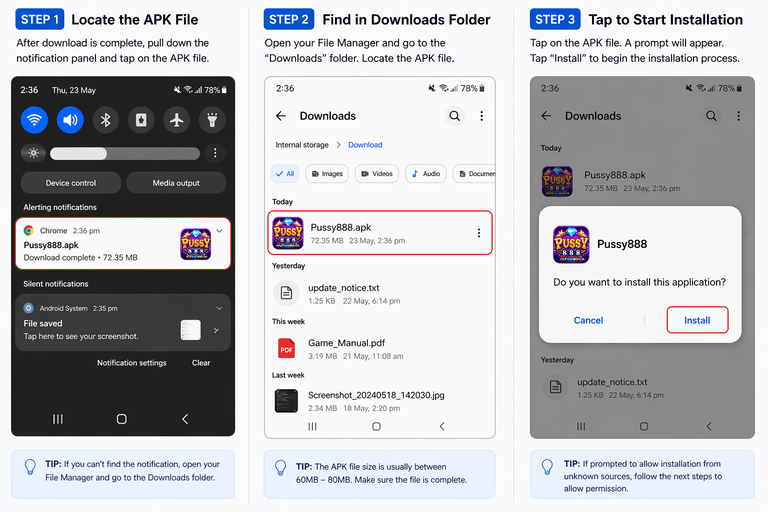
1. Locate the APK File
After the download is complete, pull down your notification panel and tap directly on the APK file.
2. Find in Downloads
If you missed the notification, open your File Manager app and navigate to your "Downloads" folder to find the file.
3. Tap to Start Installation
Tap the file. If prompted, allow "Unknown Sources" in your security settings, then tap "Install" to finish the setup.
iPhone / iPad Setup (iOS)
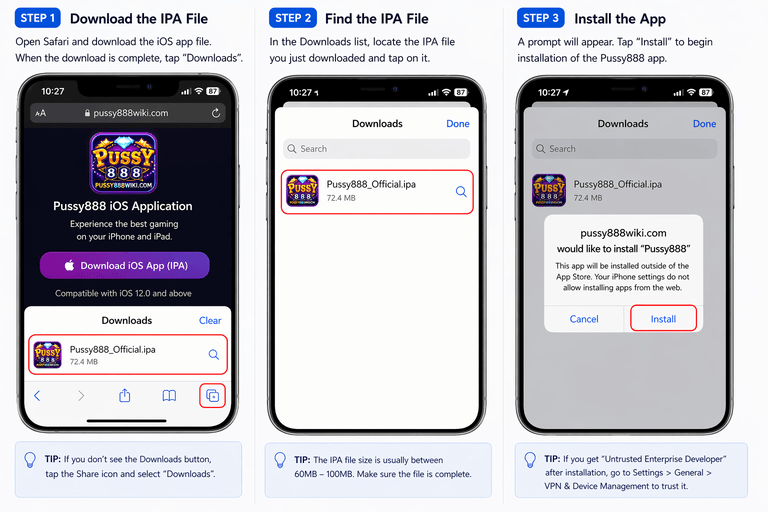
1. Cancel Untrusted Warning
When you first tap the app, an "Untrusted Enterprise Developer" warning will appear. Press Cancel.
2. Open Settings
Navigate to Settings > General > VPN & Device Management on your iPhone or iPad.
3. Trust the Profile
Tap the developer name listed under Enterprise App, press Trust, and confirm. You can now launch the game.
Common Troubleshooting
Android: "App Not Installed" Error
This usually means your device is out of storage space or you have an older, conflicting version of the app already installed. Fix: Delete the old app from your phone entirely, clear your browser cache, and try installing the new file again.
iOS: App Crashes Immediately
If the app opens and immediately closes, Apple may have revoked the current Enterprise Certificate. Fix: Return to our Download Center, delete your current app, and download the newly updated iOS profile, then repeat the Trust process.